A second Dock for macOS

Your Dock, with superpowers.

ErDock adds a second, smarter Dock to your Mac: live widgets for your day, your markets, your Mac and your messages. Put it above the Dock, on any edge of the screen, or shape it any way you like.

macOS 14 Sonoma or later · Apple Silicon and Intel · Native, no web views

The ErDock robot, wearing a red cape, flying over a glass dock
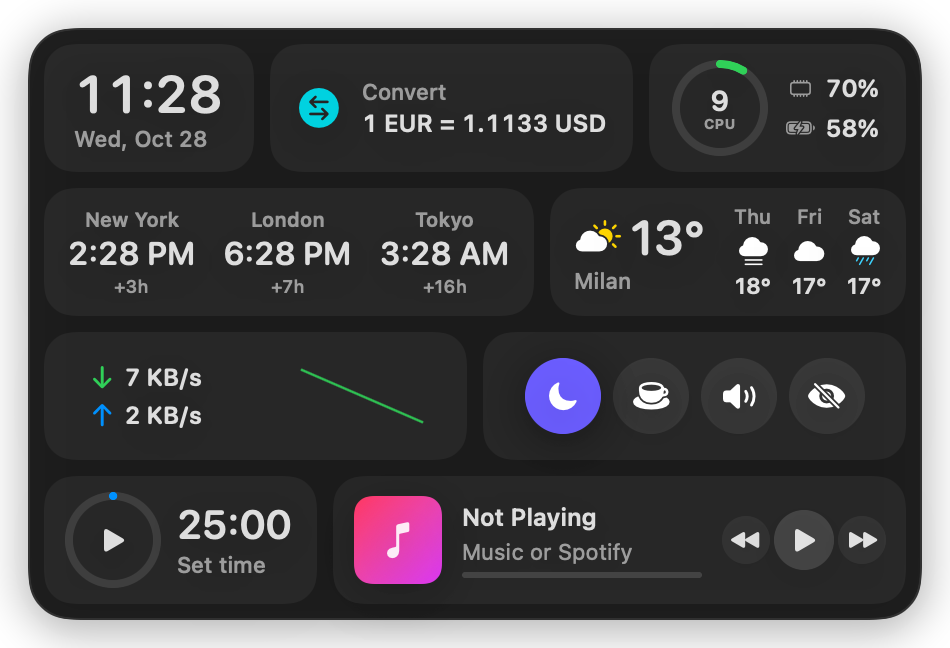
ErDock above the Dock: clock, weather, stocks, crypto, system stats, focus timer and Now Playing

ErDock sits above your Dock, on every Space, without ever stealing focus from the app you're using.

Put it anywhere. Shape it however you like.

Seven placements, one bar. On the sides, widgets stay horizontal and pack themselves into rows, so nothing turns sideways and nothing is wasted.

  • Above the DockRight where your eyes already are.
  • Bottom edgeFor people who keep the Dock hidden.
  • Top of screenJust below the menu bar.
  • Left or right edgeA column of widgets, any width you drag it to.
  • FreeDrag it anywhere, on any display.
  • Drag and resizePull any edge or corner: a row, a grid or a column, the widgets reflow to fit.
ErDock on the left edge, widgets packed into rows

24 widgets. Turn on the ones you want.

Every widget is live, and most open a fuller panel with a click. Reorder them by dragging in Settings, and save different sets as profiles.

Your day

  • Clock and World ClocksYour time and up to four cities.
  • WeatherNow, plus three days ahead.
  • CalendarYour next event, with a Join button for Zoom, Meet and Teams.
  • RemindersYour iCloud Reminders, completed from the bar.
  • Focus TimerAny length, and it can turn on macOS Focus.

Markets

  • StocksAs many US stocks and ETFs as you like, with today's chart.
  • Crypto Top 5The most traded coins, or the top five by market cap.
  • Converter22 currencies at ECB rates, plus units.

Your Mac

  • System StatsCPU per core, GPU, memory pressure, disk, battery cycles, busiest apps.
  • Network SpeedLive download and upload.
  • Device BatteriesAirPods, Magic accessories, iPhone and iPad.
  • Quick TogglesDark Mode, Keep Awake, Mute, hide desktop icons.

Get things done

  • QuickSend a message or an email without opening an app.
  • AskChat with Apple Intelligence, right on your Mac.
  • Todos and Quick NoteLists and notes, one click away.
  • Clipboard HistoryYour last 20 copies, password managers skipped.
  • Color PickerAny pixel on screen, in HEX, RGB, HSL, HSB and CMYK.

Apps, files and music

  • Favorite AppsWith suggestions of the apps you use most.
  • Downloads and File ShelfDrag files in, drag them out.
  • Now PlayingApple Music or Spotify, with controls.

The superpowers.

The small things that make ErDock feel like part of macOS.

Ask, on your Mac

Questions answered by Apple Intelligence's on-device model. Nothing leaves your Mac, and it costs nothing to use. ⌥⌘I

Quick messages

Start typing a name, pick from your contacts, send an iMessage or an email. Messages and Mail never open. ⌥⌘M

Charge before you go

An event across town in an hour, and your iPhone at 40%? ErDock tells you to charge it before you leave.

Join on time

Five minutes before a call, a notification with a Join button for Zoom, Google Meet, Teams, Webex or FaceTime.

Profiles

Work, home, trading: each with its own widgets, placement and style. Switch from the menu bar.

Out of the way when you want it

Hide it automatically until the mouse touches the edge, or toggle it from anywhere. ⌥⌘L

It stays on your Mac.

No account, no tracking, no analytics. Your notes, todos, clipboard and settings live on your Mac. ErDock asks for each permission only when you use the feature that needs it, and keeps API keys in your Keychain.

ErDock only talks to the services your widgets need:

WeatherData from MET Norway
StocksFinnhub, with your own free key
CryptoCrypto.com Exchange and CoinGecko
Exchange ratesEuropean Central Bank, via Frankfurter

Pay once. Keep it.

A one-time purchase, no subscription. Your license key arrives by email right after checkout.

Personal

€19 one time
  • 1 Mac
  • All 24 widgets and every placement
  • Free updates for version 1
Buy for 1 Mac

Prices include VAT where it applies; checkout, invoices and taxes are handled by Lemon Squeezy. Moving to a new Mac? Deactivate the old one in Settings and activate the new one.

Questions

Does ErDock replace the macOS Dock?

No. It works alongside it. You can keep the Dock as it is, hide it and put ErDock on the bottom edge instead, or use ErDock on a side of the screen.

Which Macs does it run on?

Any Mac with macOS 14 Sonoma or later, Apple Silicon or Intel. The Ask widget needs macOS 26 with Apple Intelligence turned on.

What permissions does it ask for?

Only what a widget you turn on needs, and only when you first use it: Calendars and Reminders, Contacts for Quick, Automation for music and messages, Location for battery alerts, and Notifications.

Do I need any accounts?

No. The Stocks widget uses your own free Finnhub key, which you can add in Settings if you want stock prices. Everything else works out of the box.

Can I use it on more than one Mac?

The Personal license covers one Mac and Multi-Mac covers three. You can move a license between Macs at any time from Settings → License.

Does it work with multiple displays?

Yes. Choose which display the bar lives on, or drag it to any screen in the free placements; it resizes to fit each screen.